Custom Halloween Socks Ideas: Photos, Pets and Spooky Designs
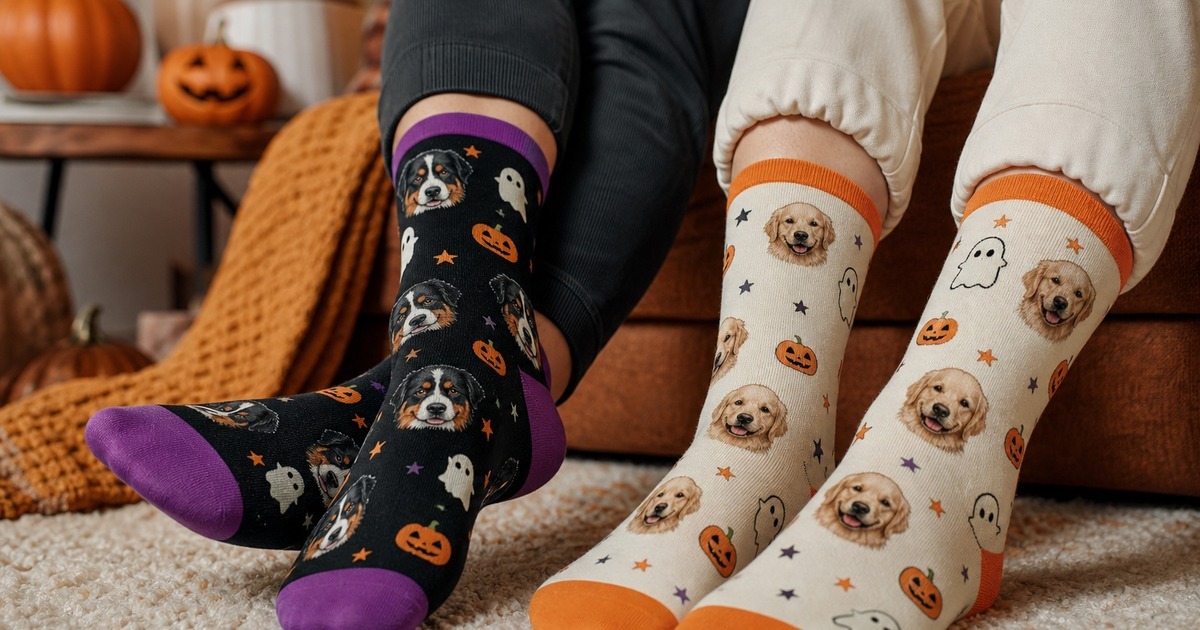
Socks offer a compact canvas, so every visual choice matters. Begin with one clear concept, check the available product preview, and avoid tiny details that disappear at normal viewing distance. Browse custom socks and use these steps to prepare artwork that stays simple and readable.
Which Photos Work Best on Custom Halloween Socks?
Use an original, well-lit image with the face looking toward the camera. Crop close enough that the eyes, ears, and expression remain visible. Avoid dark screenshots, motion blur, strong shadows across the face, and photos where the subject blends into the background.
How Can You Turn a Pet Photo Into a Halloween Design?
Start with one recognizable pet portrait and add a small seasonal accent around it. A pumpkin, star, moon, bat, or simple ghost shape can establish the theme without hiding the face. A repeating pet-face pattern is easier to scan when each portrait has consistent size and spacing.
Should You Add a Name or Phrase?
A short name, date, or two-word phrase can support the image if the product option allows text. Use high contrast and check every letter in the preview. Long sentences and thin decorative lettering are more likely to become difficult to read on a small, flexible surface.
How Do You Keep Spooky Patterns Readable?
Limit the palette to a few colors and repeat one main motif. Orange and cream can stand out against black, while muted purple can add contrast without making the layout busy. Leave open space between faces, words, and seasonal shapes.
How Can Halloween Socks Fit a Coordinated Outfit?
Match one color or motif instead of duplicating the entire design. Socks with orange accents can connect to a black shirt, while a pet portrait can become the personal detail in an otherwise simple family outfit. For more coordinated gift ideas, see personalized Halloween gifts for families and friends.
What Should You Review in the Product Preview?
Check the crop on both socks, the direction of the pattern, text spelling, and whether important details sit near a seam or edge. If the current product editor offers different layouts, choose the one that keeps the main face largest and clearest.
Where Can You Find Current Ordering Guidance?
Product options and policies can change. Use the Custom Gifts FAQ for current help with artwork, ordering, shipping, and returns, then confirm the options shown on the item page.
FAQ
What image quality is best for photo socks?
Use the largest original image available, with a sharp, well-lit face and a simple background. Avoid images downloaded from social media when an original file is available.
Can a pet photo work with a Halloween pattern?
Yes as a design concept: keep the pet face dominant and use small seasonal motifs around it. Confirm the current product editor supports the layout you want.
How much text should go on custom socks?
Use a short name or phrase and strong contrast. The smaller the design area, the more important it is to remove unnecessary words.
Choose a bright photo or simple motif, keep the spacing open, and inspect the product preview carefully.
Shop custom socks | Read the custom gifts FAQ